
August 12, 2026 · SIMATIC AXSiemensS7-1200 G2PLC programmingindustrial automation
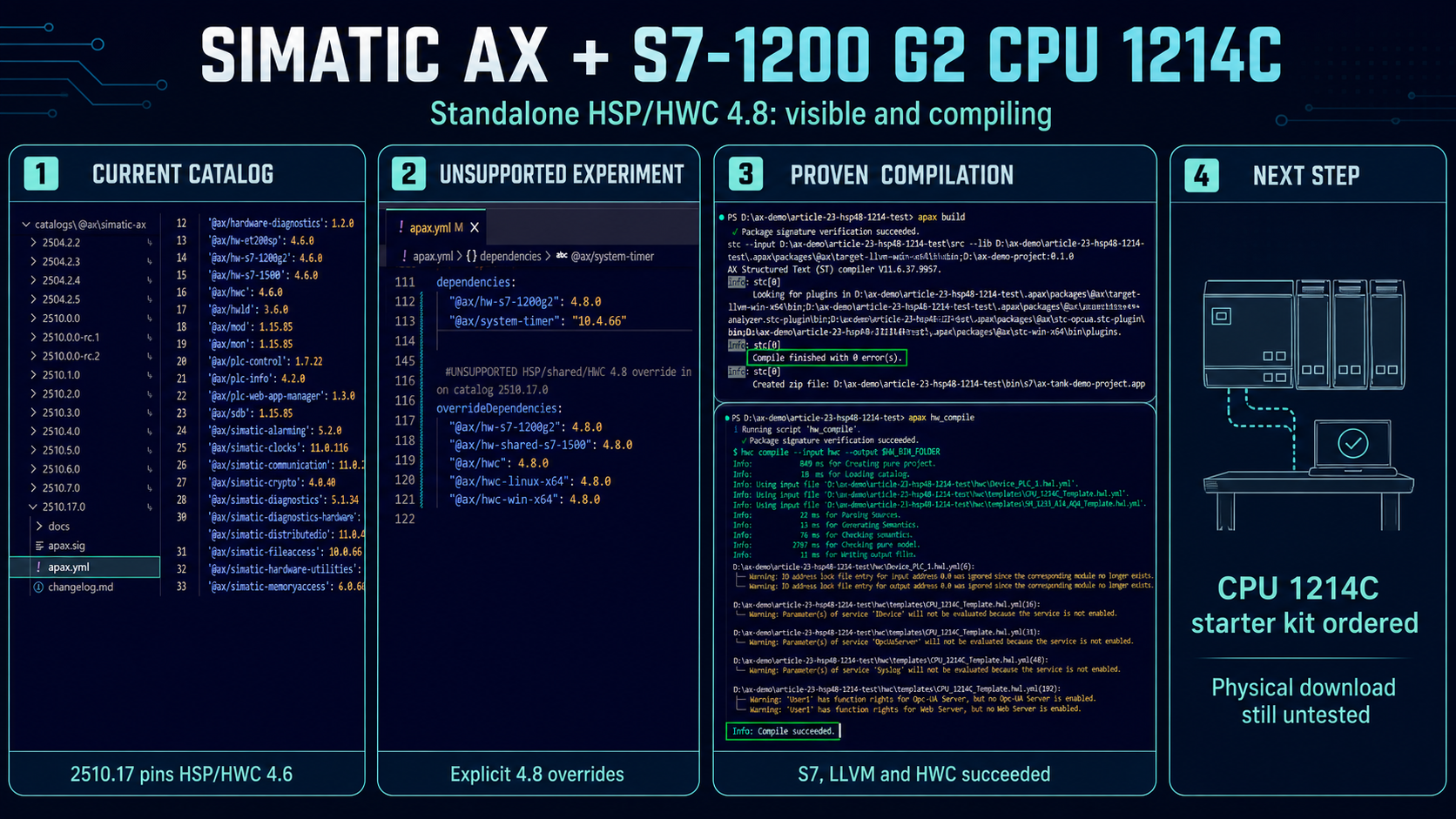
I opened my tank-control project today with a simple plan: spend some time investigating Ladder programming in SIMATIC AX.
I wanted to add a small XLad routine—AX’s graphical Ladder language—and see how it feels beside the Structured Text already running the demo.
Then I made one quick hardware check.
That check took over the day.
The project from Article 20 showed one S7-1200 G2 controller, the CPU 1212C. A registry search showed something newer: Siemens had published standalone 4.8 versions of the S7-1200 G2 hardware support package and the hardware compiler. I immediately wondered whether the popular CPU 1214C had arrived with them.
It had.
By the end of the investigation, SIMATIC AX had generated a CPU 1214C template, built the S7 and LLVM applications, and compiled a 1214C-plus-SM1233 hardware configuration. I also learned why a normal package update did not reveal the new CPU, worked through certificate and module-template problems, and ordered a CPU 1214C starter kit for the physical test.
One important caution runs through this whole article: Siemens’ current coordinated catalog still selects HSP/HWC 4.6. My successful 4.8 result uses explicit unsupported experimental overrides in a copied project. The physical download remains untested.
The day started with the old one-CPU result
Before changing anything, I copied the Article 20 project into a new test folder and recreated its locked packages:
apax install --immutable
The copy gave me room to experiment while keeping the original project ready to use.
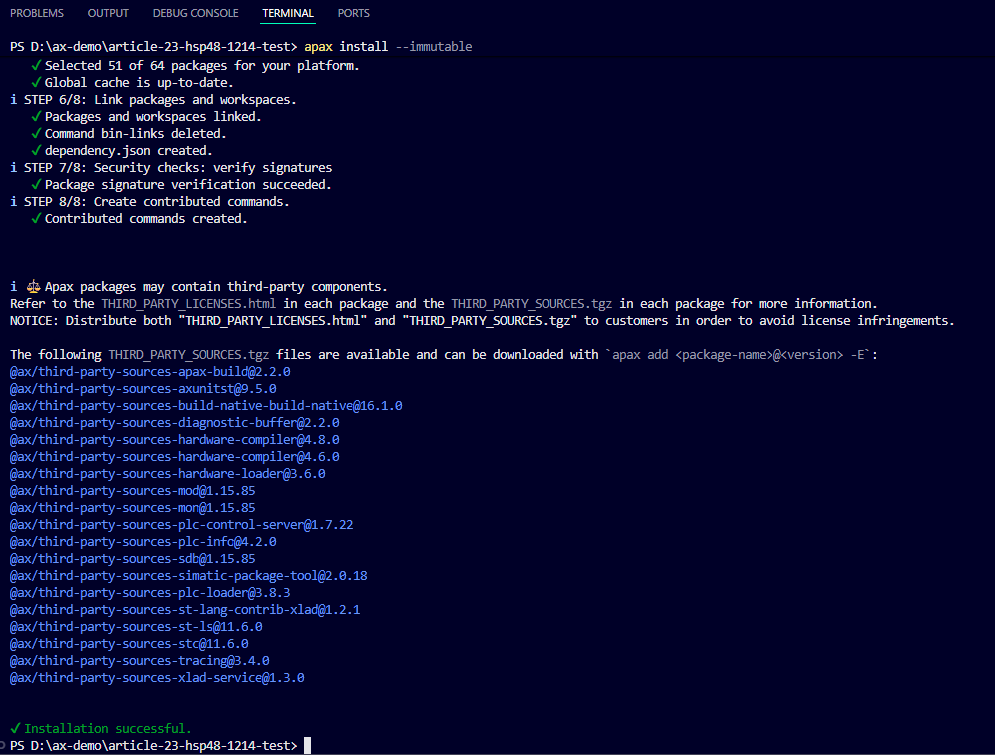
The copied project is open in AX Code and its locked package installation completes successfully.
Then I asked the installed hardware compiler what it could see:
apax hwc get-supported-devices
The default table output is easy to read. In the S7-1200 G2 section, the installed 4.6 hardware data showed one controller:
- CPU 1212C DC/DC/DC
- order number
6ES7 212-1AG50-0XB0 - firmware V4.1
The signal modules appeared below it. There was no CPU 1214C row.
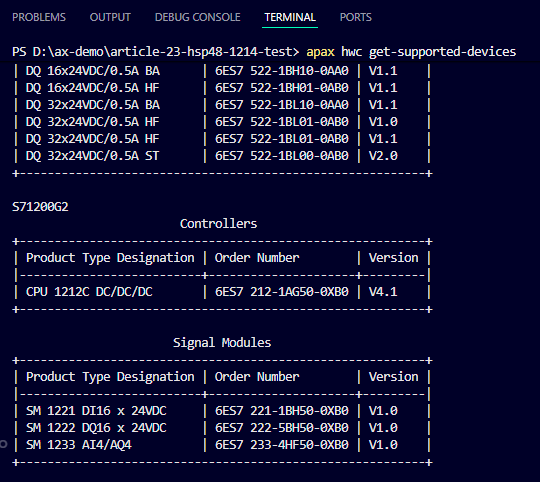
The original device list shows CPU 1212C as the only S7-1200 G2 controller in the project.
A newer package was waiting in the registry
Next I searched the AX package registry:
apax search @ax/hw-s7-1200g2 --no-input
apax search @ax/hwc --no-input
Both searches returned version 4.8.0. That was the first exciting moment of the day: newer device definitions and a matching hardware compiler were already published.
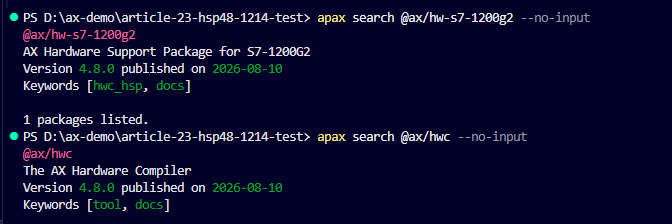
The AX registry lists standalone 4.8 releases for the S7-1200 G2 HSP and HWC.
HSP means hardware support package. It supplies the device definitions. HWC is the hardware compiler that reads those definitions and builds the hardware configuration.
Package availability was only the first part of the story. I still needed to know which versions my project was actually using:
apax tree -f @ax/hwc
The tree showed HSP 4.6 and HWC 4.6.
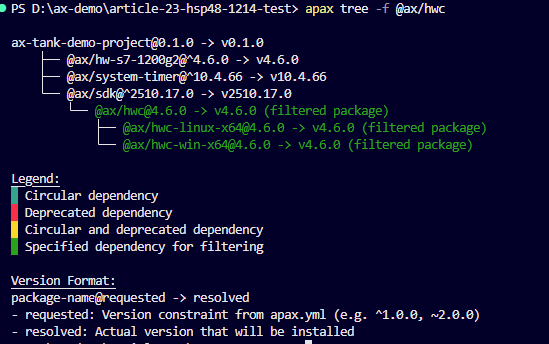
The original project resolves the catalog-selected HSP/HWC 4.6 toolchain.
I tried the ordinary update path next:
apax update
For this publication run, apax reported Nothing selected or no update available.

The ordinary update check finds no newer catalog-managed selection for this project.
The follow-up tree still showed 4.6:
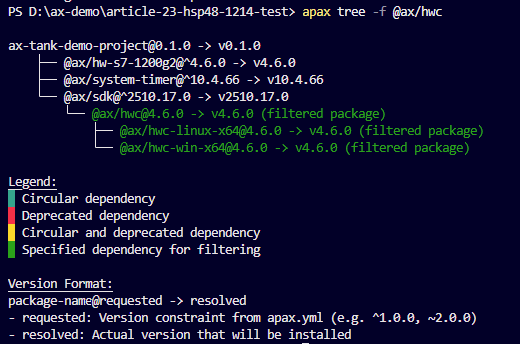
After the ordinary update check, the project still resolves HSP and HWC at 4.6.
This made the reason clear. @ax/simatic-ax is Siemens’ coordinated package catalog. Catalog 2510.17.0 selects a set of versions intended to work together:
- SDK 2510.17.0
- S7-1200 G2 HSP 4.6.0
- HWC 4.6.0
- HWLD 3.6.0
- SLD 3.8.3
SDK is the software development kit used to build the PLC application. HWLD is the hardware loader, and SLD is the software loader.
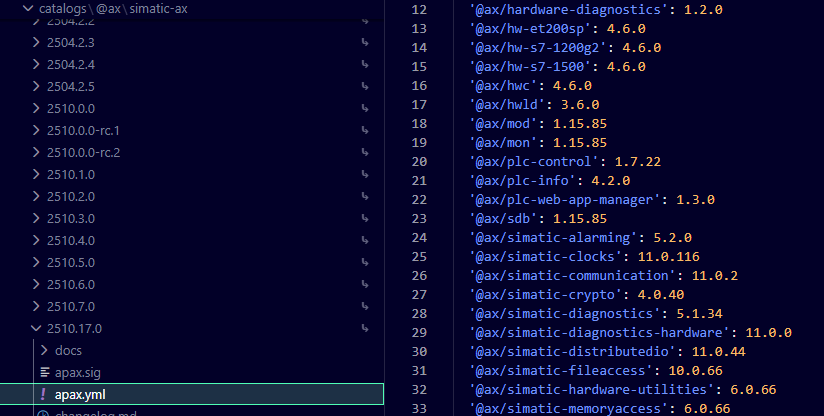
Catalog 2510.17.0 still selects HSP/HWC 4.6 even though standalone 4.8 packages exist.
That explains the apparent contradiction. The registry can contain a newer standalone package while the current catalog continues to select an older coordinated set.
I tried 4.8 in the copied project
Curiosity won. I wanted to see what the published 4.8 packages could actually do.
I kept the working Article 20 project unchanged and edited only the copy. If the package combination failed, I could return to the original immediately.
The following apax.yml change is the heart of the experiment:
UNSUPPORTED EXPERIMENTAL OVERRIDE
catalogs:
  "@ax/simatic-ax": ^2510.17.0

devDependencies:
  "@ax/sdk": ^2510.17.0

dependencies:
  "@ax/hw-s7-1200g2": 4.8.0

overrideDependencies:
  "@ax/hw-s7-1200g2": 4.8.0
  "@ax/hw-shared-s7-1500": 4.8.0
  "@ax/hwc": 4.8.0
  "@ax/hwc-linux-x64": 4.8.0
  "@ax/hwc-win-x64": 4.8.0
The direct dependency requests HSP 4.8. The five override lines force the shared hardware and HWC packages to 4.8 even though catalog 2510.17 selects 4.6.
This is useful for research in a project copy. It is outside the coordinated Siemens catalog, so I would not introduce it into a production project as a routine update.
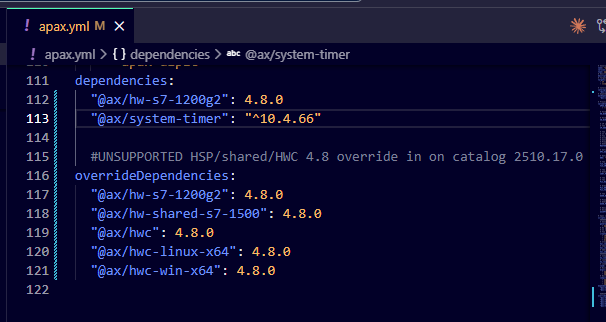
The copied project keeps catalog and SDK 2510.17 while explicitly forcing the HSP/shared/HWC packages to 4.8.
I installed the changed dependencies:
apax install
The first resolution can print override warnings while apax rewrites the lock file. Once the lock and project configuration agree, a later install can finish cleanly with Installation successful. That clean output is normal.
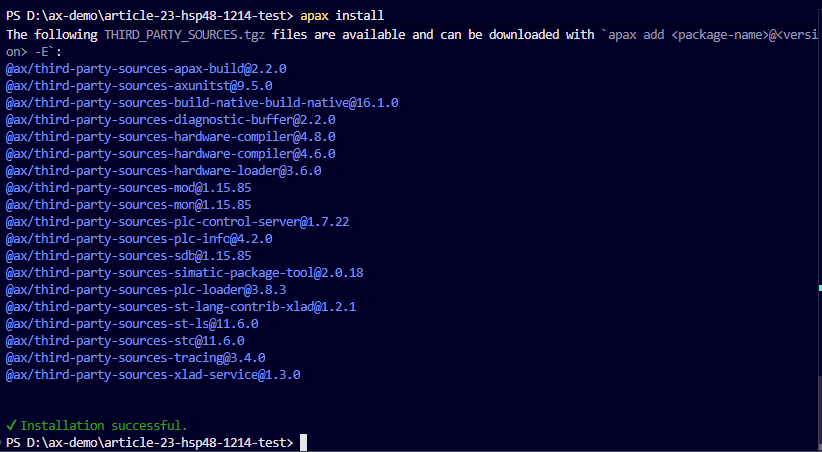
The copied project installs successfully after the lock file and 4.8 selections are synchronized.
The resolved tree finally showed the combination I wanted to test: HSP 4.8, HWC 4.8, and the HWC platform package at 4.8.
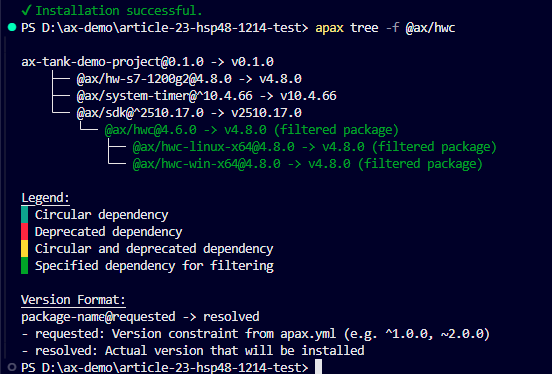
The copied test project is now running the experimental HSP/HWC 4.8 path.
CPU 1214C appeared—and it brought company
I ran the device query again. This time the S7-1200 G2 list contained six CPUs:
| Device | Order number | Firmware |
|---|---|---|
| CPU 1212C AC/DC/Rly | 6ES7 212-1BG50-0XB0 | V4.1 |
| CPU 1212C DC/DC/DC | 6ES7 212-1AG50-0XB0 | V4.1 |
| CPU 1212C DC/DC/Rly | 6ES7 212-1HG50-0XB0 | V4.1 |
| CPU 1214C AC/DC/Rly | 6ES7 214-1BH50-0XB0 | V4.1 |
| CPU 1214C DC/DC/DC | 6ES7 214-1AH50-0XB0 | V4.1 |
| CPU 1214C DC/DC/Rly | 6ES7 214-1HH50-0XB0 | V4.1 |
There it was: CPU 1214C DC/DC/DC, the exact variant I wanted for the bench.
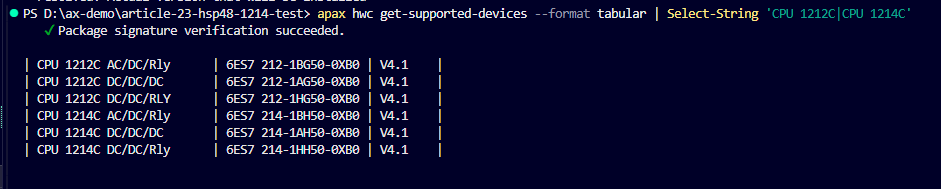
HWC 4.8 lists all three CPU 1212C variants and all three CPU 1214C variants at V4.1.
The package also listed three signal modules:
| Device | Order number | Firmware |
|---|---|---|
| SM 1221 DI16 x 24VDC | 6ES7 221-1BH50-0XB0 | V1.0 |
| SM 1222 DQ16 x 24VDC | 6ES7 222-5BH50-0XB0 | V1.0 |
| SM 1233 AI4/AQ4 | 6ES7 233-4HF50-0XB0 | V1.0 |

The verified 4.8 list includes SM1221, SM1222, and SM1233. I found no signal boards in this package version.
From a device row to a real hardware configuration
Seeing the CPU in a list was encouraging. The next question was whether HWC could generate and compile its YAML hardware definition.
I generated the CPU 1214C DC/DC/DC template with its Siemens order number—also called an MLFB—and firmware:
apax hwc generate-template-file `
  --order-number "6ES7 214-1AH50-0XB0" `
  --version "V4.1" `
  --output "hwc/templates/CPU_1214C_Template.hwl.yml" `
  --template-name "CPU_1214C_Template"
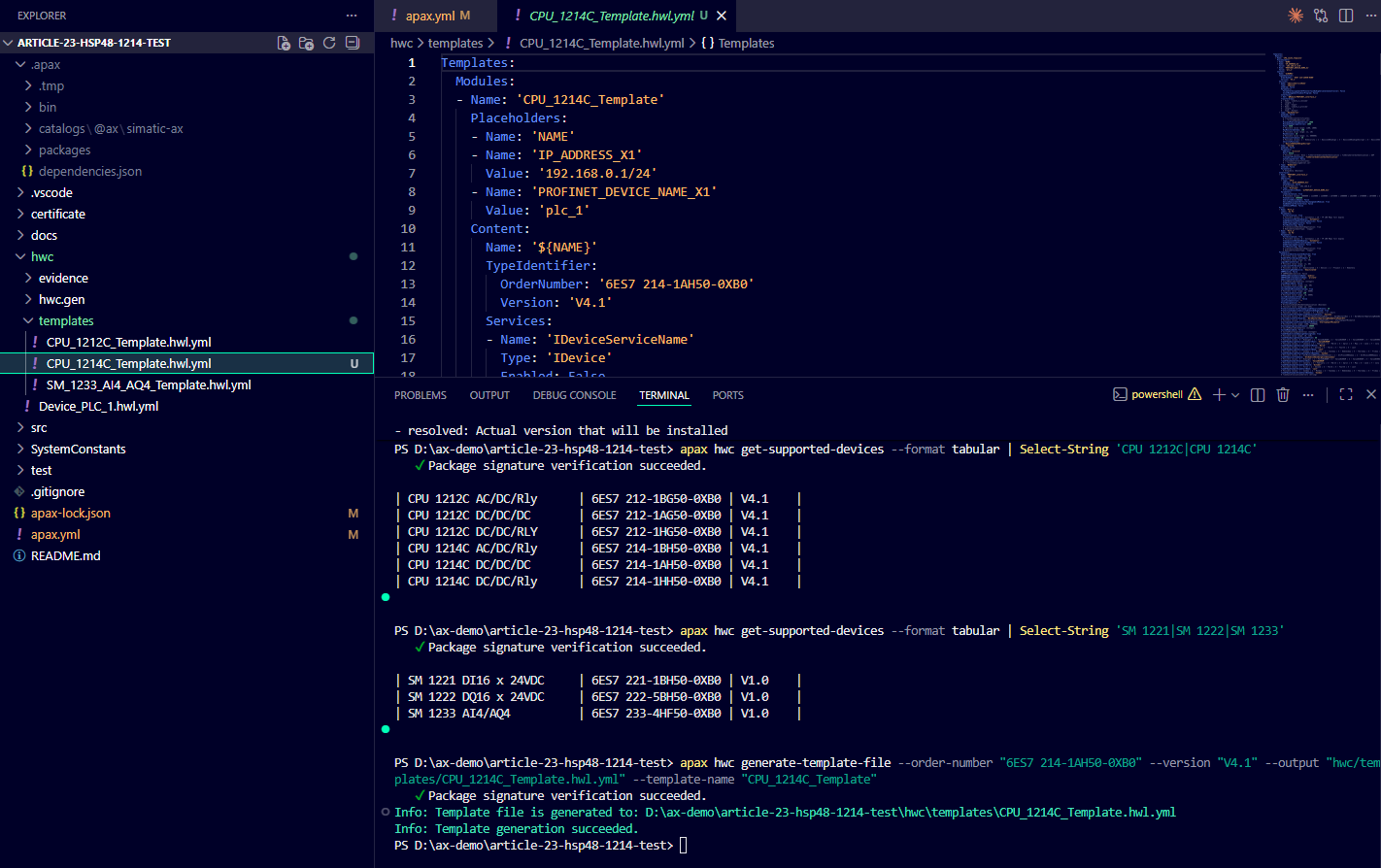
HWC 4.8 generates the exact CPU 1214C DC/DC/DC template used by the tank project.
I regenerated the SM1233 template with the same installed 4.8 packages:
apax hwc generate-template-file `
  --order-number "6ES7 233-4HF50-0XB0" `
  --version "V1.0" `
  --output "hwc/templates/SM_1233_AI4_AQ4_Template.hwl.yml" `
  --template-name "SM_1233_AI4_AQ4_Template"
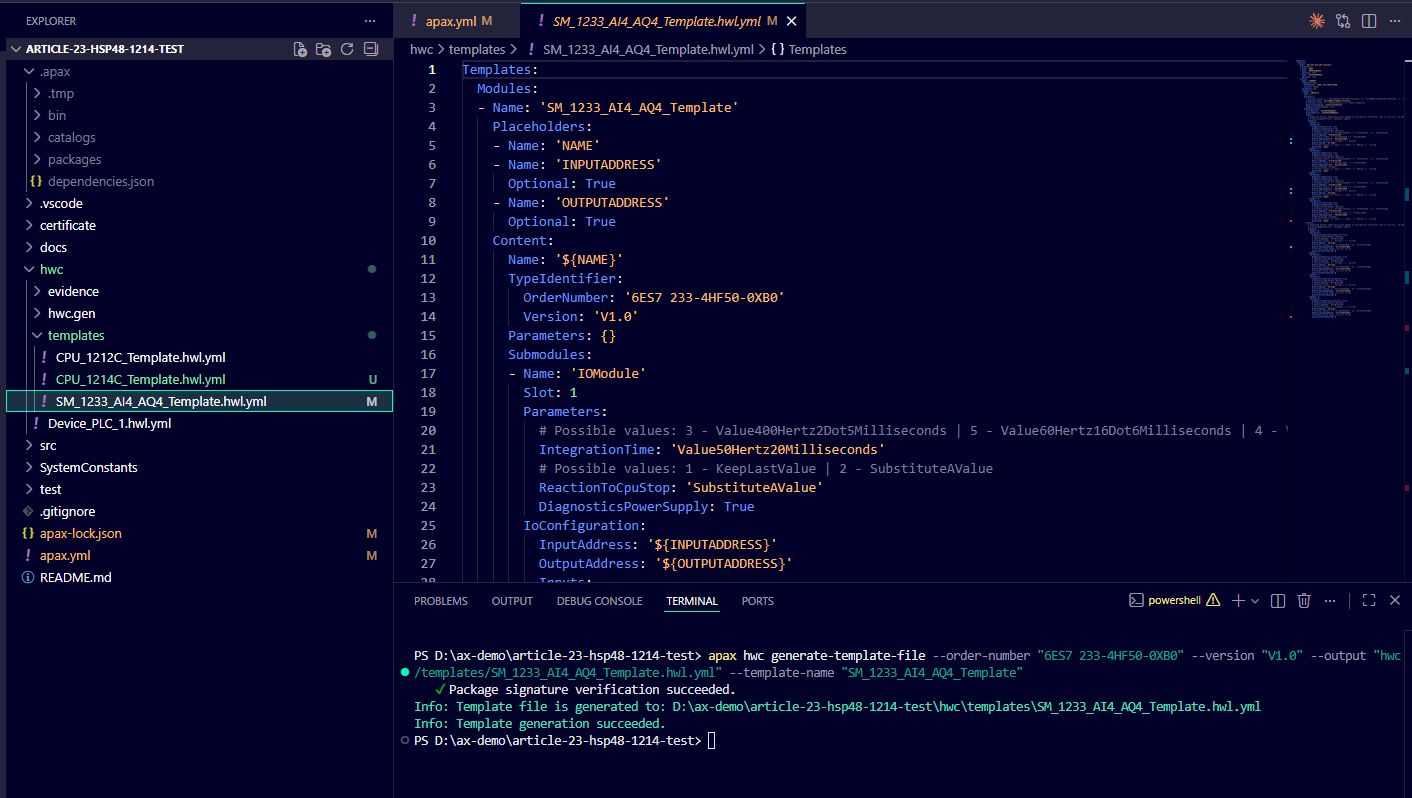
The regenerated SM1233 template matches order number 6ES7 233-4HF50-0XB0, V1.0.
That regeneration solved a real problem later in the day. The older SM1233 template included channel 4. HWC 4.8 rejected it because this AI4/AQ4 module uses channels 0 through 3. The corrected generated template stops at channel 3, matching the HSP 4.8 fix for the module.
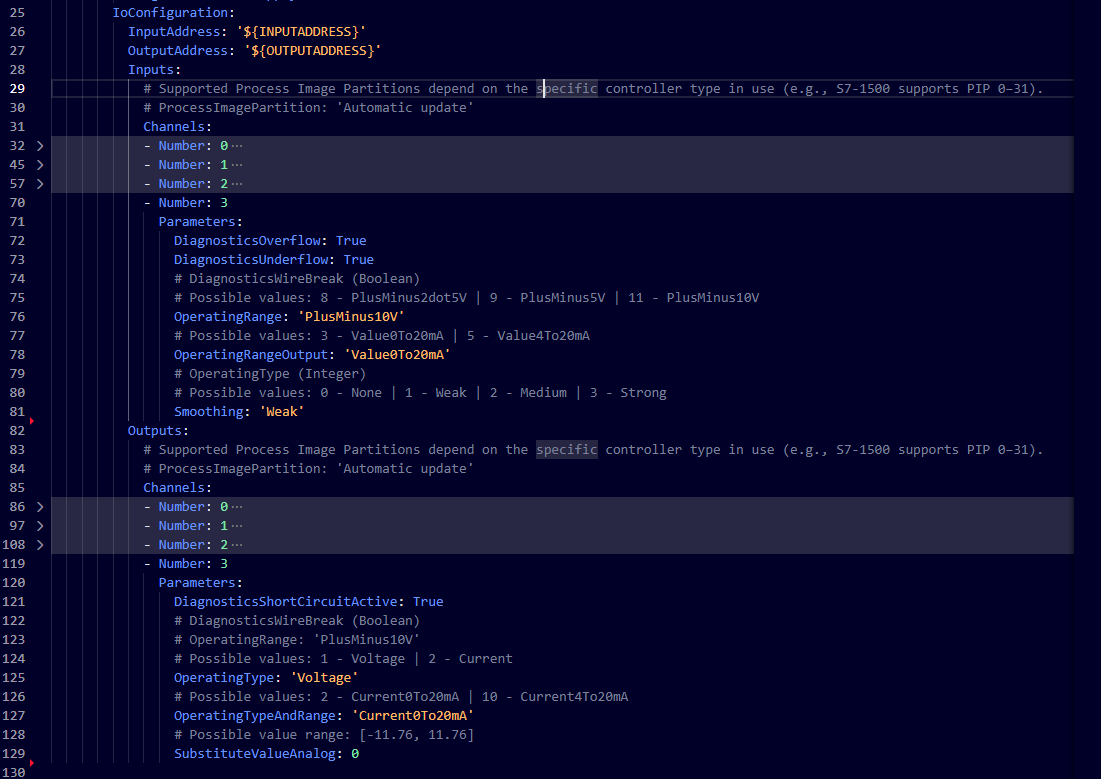
The HWC 4.8 SM1233 template contains input and output channels 0–3, with no channel 4.
In Device_PLC_1.hwl.yml, I applied the new CPU template and retained the regenerated SM1233:
Devices:
  - Name: 'AXTankDemoDevice'
    Modules:
      - Apply: 'CPU_1214C_Template'
        Arguments:
          NAME: 'PLC_1'
          IP_ADDRESS_X1: '192.168.0.1/24'
          PROFINET_DEVICE_NAME_X1: 'ax-tank-demo-plc'
      - Apply: 'SM_1233_AI4_AQ4_Template'
        Arguments:
          NAME: 'SM_1233_AI_AQ_1'
          INPUTADDRESS: '64'
          OUTPUTADDRESS: '64'
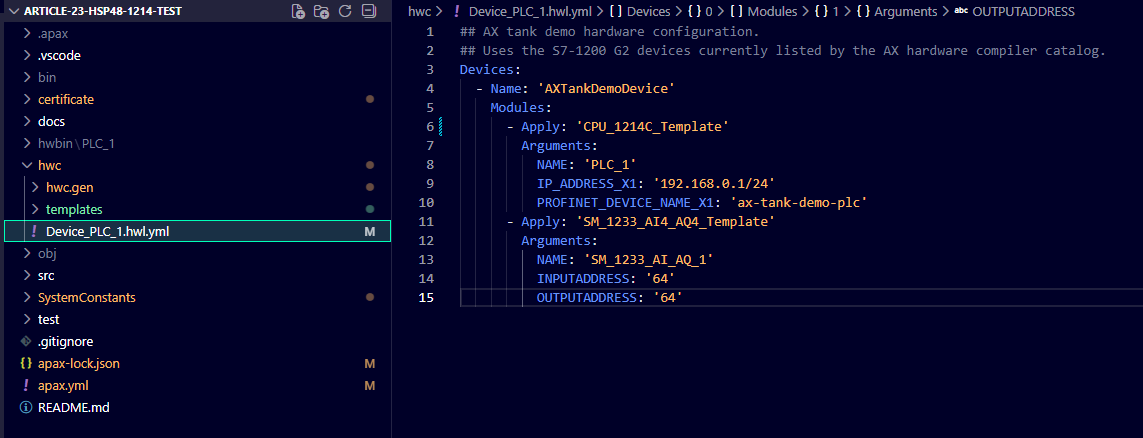
The device declaration applies CPU_1214C_Template and SM_1233_AI4_AQ4_Template. The final compile image later in the article shows the exact three files HWC reads.
One small file-location detail mattered. HWC recursively reads hardware YAML anywhere under hwc. When I left the old CPU 1212 template under hwc/evidence, HWC still treated it as an active input. Moving that historical file to a top-level folder beside hwc left only the device declaration, CPU 1214 template, and SM1233 template in the compile.
A 1.3 GB detour on the network share
The package installation gave me another surprise. On a Windows network share, normal apax install could not create its usual package links. This command worked:
apax install --copy-local
It copied the resolved packages into .apax, growing the project to roughly 1.3 GB.
On a local Windows NTFS drive, normal apax install can use the central cache and is the better first choice. I would reach for --copy-local only when package-link creation fails on the filesystem I am using.
The compiler made me fix security properly
At this point I had the right CPU and module templates, yet HWC still would not finish. The next problems appeared one by one:
- The copied security configuration carried old PKI data.
- The P12 certificate passphrase was unknown.
User1needed a password.- The old SM1233 template still had the invalid channel.
That sequence was frustrating in the moment and useful afterward. Each fix let HWC move farther through the configuration.
TLS—Transport Layer Security—protects communication between the engineering project and PLC. The P12 file contains the certificate identity and private key, so I handled it as a secret. I generated a new disposable certificate with a known strong passphrase from an AX Code Git Bash terminal:
bash certificate/createCertificateViaOpenSSL.sh --dns myplc.example.com --ip 192.168.0.1 --uri opc.tcp://192.168.0.1:4840
The script prompted for the P12 passphrase without putting it in the command. I kept the PLC master password, P12 passphrase, and User1 password as three separate values and stored none of them in apax.yml, screenshots, or article notes.
For HWC commands containing an intentional empty password argument, I used Command Prompt inside AX Code. In this workflow, PowerShell dropped the empty native argument and shifted the remaining arguments.
After removing only the copied generated hwc/hwc.gen/PLC_1.SecurityConfiguration.json, I set up secure communication:
apax hwc setup-secure-communication --input hwc --module-name PLC_1 --master-password ""
Then I imported the new P12 for TLS:
apax hwc import-certificate --input hwc --module-name PLC_1 --certificate certificate/containerWithPublicAndPrivateKeys_x509.p12 --passphrase "" --purpose TLS
The empty "" tells HWC to prompt securely. I entered the actual passphrase only at the hidden prompt.

HWC imports the P12 and assigns it to TLS; the secret-entry prompt is masked.
Finally, I set the User1 password the same way:
apax hwc manage-users --input hwc --module-name PLC_1 set-password --username User1 --password ""
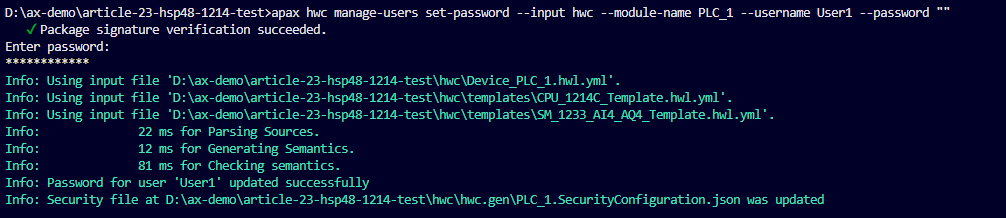
HWC accepts the User1 password update while the entered value remains hidden.
Never place a real password or passphrase directly in these commands. If one has already been exposed, replace it and rotate it anywhere it was reused.
The result I had been chasing
With the CPU, module, certificate, and user configuration corrected, I ran the application build:
apax build
One run built both targets:
- S7 application: zero errors
- LLVM local-test application: zero errors
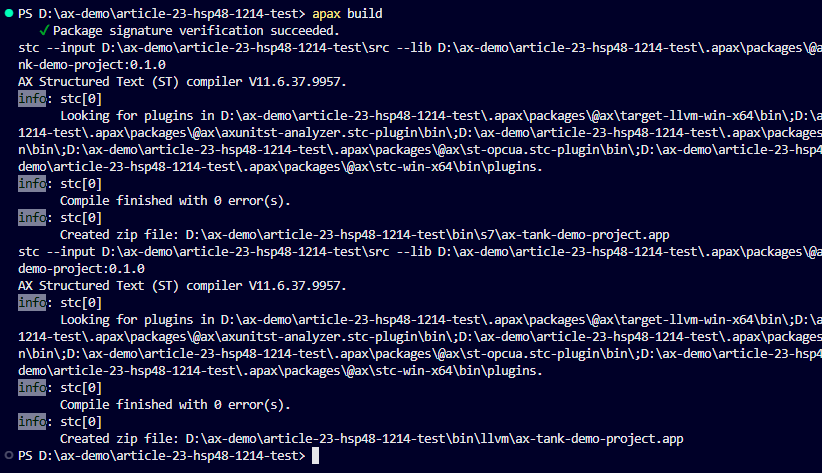
The final application build creates both S7 and LLVM outputs with zero errors.
Then came the hardware compile:
apax hw_compile
HWC read exactly three inputs:
Device_PLC_1.hwl.ymlCPU_1214C_Template.hwl.ymlSM_1233_AI4_AQ4_Template.hwl.yml
It completed parsing, semantic checks, model generation, and output writing. The final line was the one I wanted to see:
Compile succeeded
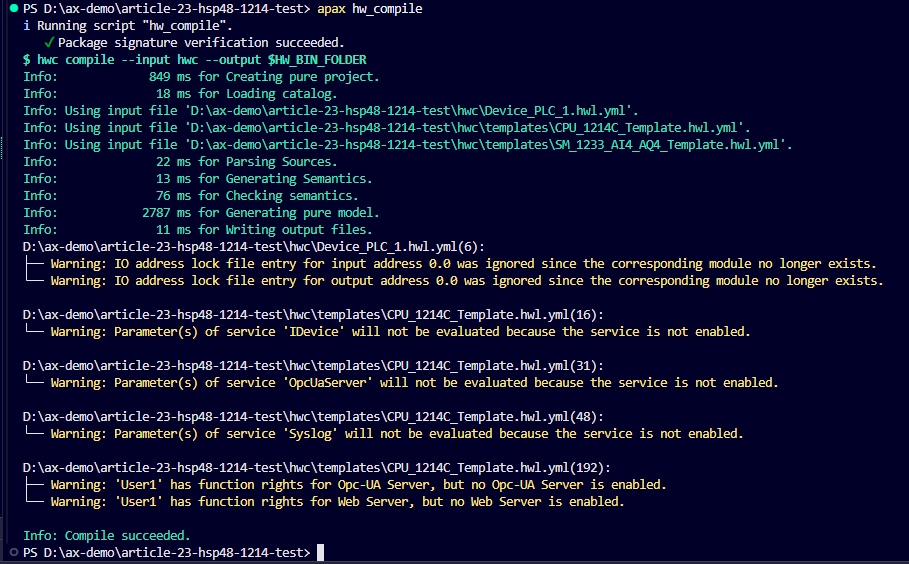
HWC 4.8 reads the device, CPU 1214C, and SM1233 files and completes the hardware build successfully.
The run included warnings for disabled IDevice, OPC UA, and Syslog services, plus User1 rights associated with disabled services. Those settings are unused in this demo, and HWC completed successfully.
Back to the plan—Ladder is next
This detour gave me a much clearer picture of the S7-1200 G2 hardware currently visible to SIMATIC AX. The standalone 4.8 packages list the CPU 1214C DC/DC/DC at 6ES7 214-1AH50-0XB0, V4.1, generate its template, and compile it with the SM1233. I ordered a CPU 1214C starter kit for later bench testing, though the work in this series continues independently of its arrival.
Now I am returning to the task I originally opened the project for: investigating Ladder programming in SIMATIC AX and adding it to the tank-control application. After that, I will build the HMI in WinCC Unified Elements. Both chapters can move ahead in the current development environment without waiting for a physical PLC download.
The technical caution from this investigation remains. Catalog 2510.17 still selects HSP/HWC 4.6, while the successful 4.8 build uses an unsupported experimental override. I have not loaded this 1214C configuration into a physical CPU. I can revisit that test later when it fits the bench work; it is not the next step in the series.
Next up: Ladder in SIMATIC AX, followed by the WinCC Unified Elements HMI.
Discuss this article on LinkedIn: Does SIMATIC AX Already Support the S7-1200 G2 CPU 1214C?.
Working on something similar?
I am Yuriy Mosiyenko — I design and program industrial control systems, mostly Siemens, as a one-person practice based in Bedford, Nova Scotia, working with customers across Canada. If you have a controls project you cannot staff internally, tell me what you are building.
